 Folders
How to open .XLSX files (Excel workbooks) on Android, Windows and Linux
What an .xlsx file is and how to open, view and edit Excel XLSX spreadsheets for free on Android, Windows and Linux, without Microsoft Excel or an account.
 Satyam Mishra5 min read
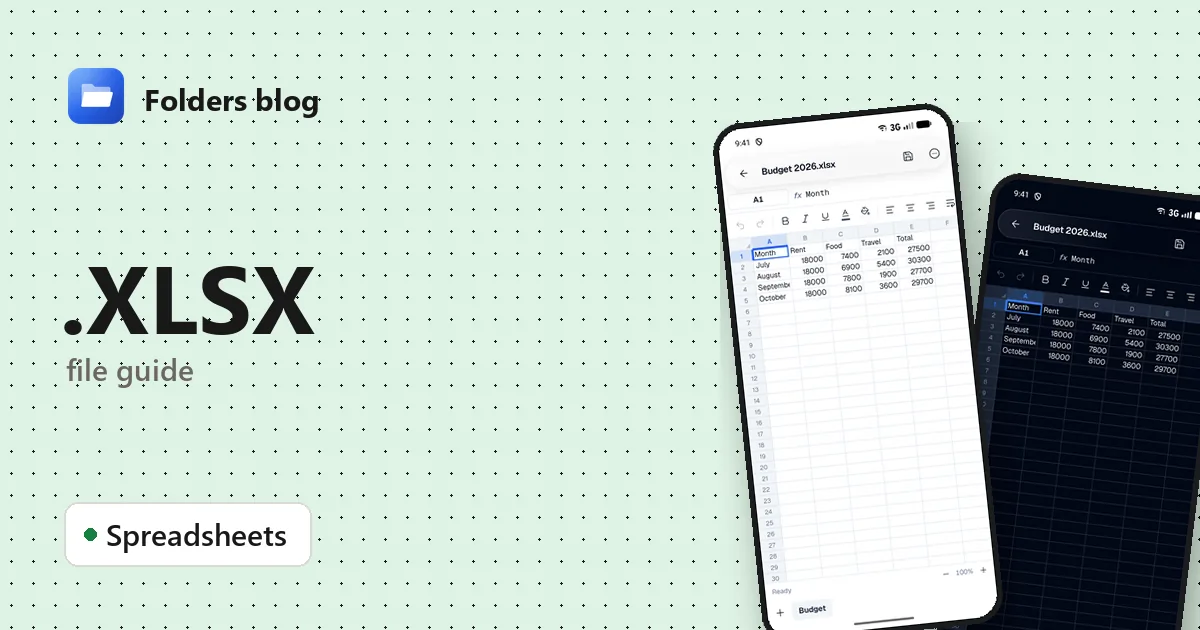
The club treasurer emails the accounts as an .xlsx file, or your bank offers statements as a spreadsheet. Your phone suggests installing Excel and signing in; a Linux laptop may have nothing to open it with.
You don’t need Excel to look at a spreadsheet or fix a number in it. Folders, a free file manager for Android, Windows and Linux, opens .xlsx files in its own spreadsheet editor, with every sheet, and saves your changes without an account.
What is an .xlsx file?
An .xlsx file is a Microsoft Excel workbook, Excel’s standard format since 2007, when it replaced the older .xls. Like Word’s DOCX, it uses Office Open XML, an international standard, so many other programs read and write it.
Inside, an XLSX is a ZIP archive of XML files:
- xl/workbook.xml lists the sheets;
- xl/worksheets/ holds one file per sheet with its cells;
- xl/sharedStrings.xml stores each piece of text once, and cells point to it, which keeps files small when the same words repeat;
Each sheet can have up to 1,048,576 rows and 16,384 columns (column XFD), far more than the 65,536 rows of the old .xls. A formula is saved together with the result it last showed.
Excel has close relatives that are easy to confuse:
| Extension | How it differs from .xlsx |
|---|---|
| .xls | The older binary format of Excel 97–2003 |
| .xlsm | A workbook that contains macros |
| .xltx, .xltm | Templates for new workbooks |
| .csv | Plain text with commas, no formatting or sheets |
| .ods | The OpenDocument spreadsheet format from LibreOffice |
How to open an .xlsx file with Folders
On Android
- Install Folders from the download section and allow it to see your files.
- Find the workbook. Downloads and saved attachments are usually in Download; typing .xlsx in the search box finds every workbook in the folder you’re in and the folders inside it.
- Tap the file. It opens in Folders’ spreadsheet editor.
- From Gmail, Outlook, WhatsApp or any other app, choose Open with → Folders.
On Windows and Linux
- Install Folders: setup program or MSIX for Windows 10 and 11; deb, rpm, AppImage, Flatpak, Snap or tar.gz for Linux.
- Browse to the workbook in Folders and double-click it.
- On Windows, right-click the .xlsx in File Explorer and choose Open with → Folders.
What you can do with it in Folders
- Sheets as tabs: you can add, rename, duplicate, hide, move and delete sheets.
- Tap a cell to see exactly what’s in it, and change it.
- Format cells: bold, italic, alignment and fill colour.
- Number formats: set the number of decimals, or type a custom format for dates, currencies or percentages.
- Find & replace (with match case), and Go to a cell or range such as B12 or A1:D20.
- Undo and redo while you work, then Save to write your changes back to the .xlsx.
It’s built for checking and fixing figures on the go. For charts, pivot tables or big models, Excel or LibreOffice Calc are still the right tools.
Other ways to open .xlsx files
- Microsoft Excel: on Windows, free on the web at office.com with a Microsoft account, and on phones.
- LibreOffice Calc: free and open-source for Windows and Linux.
- Google Sheets: upload the file to Google Drive and open it there.
- ONLYOFFICE: free desktop editors for Windows and Linux.
Problems opening an .xlsx file?
“This workbook is password-protected and can’t be opened here.” Folders is telling you the file is encrypted with a password to open. Excel and LibreOffice Calc ask for the password. A protected sheet is different: it only stops cells being changed.
Dates show up as numbers like 45600. Excel stores dates as a count of days since the start of 1900 and relies on the number format to show them as dates. If that format is lost, as often happens in exported files, give the cells a custom number format such as dd/mm/yyyy in Folders.
The file is “corrupt” or won’t open. An XLSX is a ZIP, so a download cut short breaks it. Download it again; Excel’s Open and Repair can sometimes recover it.
It’s not really an .xlsx. Some websites export a CSV file or a web page and give it an .xlsx name. Excel then says the file format or extension isn’t valid. If it’s really a CSV, rename a copy to .csv and Folders opens it as a grid; if it’s a web page, download the export again in a proper format.
Questions people ask
How do I open an XLSX file without Excel? Use Folders on Android, Windows or Linux, LibreOffice Calc on a computer, or Google Sheets in a browser.
Can I edit Excel files on Android for free? Yes. In Folders, tap a cell, change it, and Save. No account or subscription is needed.
How do I convert XLSX to PDF? In Excel, use Save As and choose PDF; in LibreOffice Calc, File → Export as PDF; in Google Sheets, File → Download → PDF.
XLSX vs XLS: what’s the difference? XLSX is the modern ZIP-based format from Excel 2007 onwards, with far bigger sheets. XLS is the old binary format of Excel 97–2003.
Can an XLSX file contain a virus? An .xlsx can’t hold macros, which is how most harmful spreadsheets work; those need .xlsm or the old .xls. Still be careful with files you weren’t expecting, especially ones that ask you to “enable content”.
More spreadsheet guides: how to open XLS files, how to open CSV files and how to open XLSM files with macros. Or see all 382 file types Folders opens.
Keep reading
How to open .CSV files (comma-separated values) on Android, Windows and Linux
What a .csv file is and how to open, read and edit CSV files for free on Android, Windows and Linux, as a table with the right delimiter, no Excel needed.
How to open .ODS files (OpenDocument spreadsheets) on Android, Windows and Linux
What an .ods file is and how to open, read and edit ODS and OTS spreadsheets from LibreOffice for free on Android, Windows and Linux, and save them as .xlsx.
How to open .TSV files (tab-separated values) on Android, Windows and Linux
What .tsv, .tab and .psv files are and how to open, read and edit TSV, TAB and PSV data files for free on Android, Windows and Linux, as a clear table.